JJ Bonnie: A Playful Color Font for Creative Projects
In the diverse world of digital typography, color fonts represent a vibrant and growing niche, blending illustrative art with functional letterforms. JJ Bonnie stands out within this category as a distinctive and playful option for designers seeking a specific aesthetic. This article provides an objective evaluation of the JJ Bonnie font, exploring its characteristics, ideal use cases, and important technical considerations to help you determine if it aligns with your creative project needs.
Understanding the JJ Bonnie Font
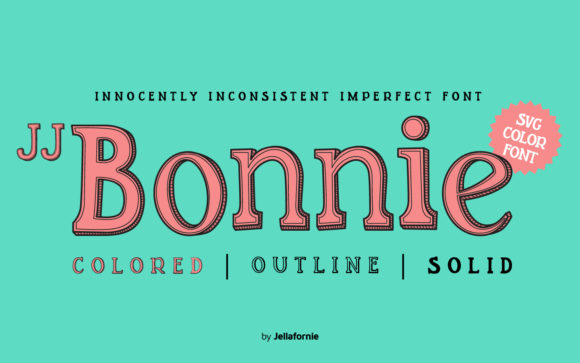
JJ Bonnie is a color font created using OpenType-SVG technology. Unlike standard fonts that apply a single color uniformly, a color font like JJ Bonnie contains multicolored glyphs and illustrative details baked into each character. The design is explicitly hand-drawn and digitally doodled, characterized by inconsistent line weights, variable alignments, and an overall irregular appearance. This intentional imperfection creates a vibe that is innocently unique, evoking a sense of spontaneous creativity rather than polished uniformity.
The font's artwork is integral; you cannot separate the color from the letterform using standard color pickers in design software. When you type using JJ Bonnie, you are essentially placing pre-drawn, colorful characters. Its compatibility includes major design applications like Adobe Photoshop, Adobe Illustrator, Silhouette Studio, and Inkscape, which support OpenType-SVG features.
Key Technical Specifications and Considerations
A crucial practical consideration for users, particularly in the craft and DIY space, is compatibility. The product files for JJ Bonnie are provided as OpenType-SVG. It is important to note that the OTF and TTF files included are not compatible with Cricut Design Space. This is a significant trade-off for designers whose workflow is centered on that platform. For software that supports the format, usage is straightforward, but consulting the provided Ultimate Font Guide is recommended for specific implementation steps.
Another inherent consideration with any color font is flexibility. Because the color and design are fixed, you cannot change the palette of JJ Bonnie without fundamentally altering the font file itself. This differs dramatically from using a standard black-and-white font where you can apply any color fill or effect. This means your project's color scheme must harmonize with the built-in colors of JJ Bonnie.
Potential Benefits and Reasons for Interest
Designers might be interested in JJ Bonnie for several practical reasons. Its primary benefit is the immediate injection of a specific, lively personality into a text element. It saves considerable time versus manually illustrating each letter or adding hand-drawn details to a standard font. For projects where a cohesive, custom-doodled look is desired, JJ Bonnie provides a ready-made solution.
The font's style makes it a strong candidate for pairing with illustrations. Its own illustrative quality can seamlessly integrate with surrounding artwork, creating a unified composition. This can be particularly effective in digital graphics, poster design, or website banners where text and image need to feel part of the same hand-crafted world.
Given its playful and irregular appearance, JJ Bonnie is naturally a fit for themes targeting younger audiences or projects requiring a lighthearted, fun tone. This includes kid-friendly websites, game interfaces (especially for casual or mobile games), educational materials, party invitations, and merchandise aimed at a youthful demographic. The font can serve as a central design element that immediately communicates the project's mood.
Situations Where JJ Bonnie is a Strong Fit
JJ Bonnie may be an excellent choice when your project goals include the following: establishing a clearly hand-drawn, informal aesthetic quickly; needing text that functions as integrated artwork rather than purely informational typography; and designing for contexts where fun and innocence are key thematic elements. It shines in visual mediums where its color and form will be displayed at a size that preserves detail, such as in digital displays or printed promotional items.
If you are working in compatible software (like Photoshop or Illustrator) and your design already employs a color palette that complements the hues within JJ Bonnie, integration can be very smooth. Furthermore, if your project avoids the need for extensive textual content—using the font for short headlines, logos, or decorative phrases—the limitations regarding color flexibility and consistent readability become less impactful.
Scenarios Where Alternatives May Be Worth Considering
Despite its unique appeal, JJ Bonnie will not be suitable for all projects. Evaluating alternatives is wise in several situations. If your workflow depends on Cricut Design Space for cutting projects, this font cannot be used, necessitating a search for other craft-compatible illustrative fonts or a return to manual illustration.
For any project requiring long paragraphs of body text, high readability, or a formal tone, JJ Bonnie is likely a poor fit. Its inconsistent alignments and weights, while charming, hinder legibility at small sizes and in dense blocks of text. In these cases, a standard, readable font paired with separate hand-drawn decorative elements might achieve a similar vibe with better functionality.
When your design requires strict color control or adherence to a specific brand palette that clashes with JJ Bonnie's built-in colors, an alternative approach is necessary. You might consider using a standard hand-drawn-style font (without color features) that you can then color manually, or explore other color fonts with a different pre-defined color scheme that matches your needs.
Practical Decision-Making Insights
To determine whether JJ Bonnie aligns with your goals, conduct a simple evaluation of your project parameters. First, assess your primary software: are you using Photoshop, Illustrator, Silhouette, or Inkscape, or are you reliant on Cricut? This is a foundational compatibility check. Next, define the role of the text: is it for decorative, short display purposes, or for lengthy, informational reading? JJ Bonnie is firmly in the decorative display category.
Then, analyze your project's visual theme. Does the innocent, doodled, and playful aesthetic directly support your message? If you are designing for a serious brand, a financial report, or a professional website, the font will likely misalign with your tone. Finally, consider your color scheme. Obtain a visual sample of the JJ Bonnie font and see if its intrinsic colors harmonize with your existing design palette. If they clash, the font may create more visual conflict than benefit.
Final Expectations and Tradeoffs
Selecting JJ Bonnie involves embracing specific tradeoffs for a distinct visual outcome. You gain speed and a cohesive hand-drawn art style but sacrifice typographic color control, Cricut compatibility, and optimal readability for long text. It is a specialist tool, not a general-purpose font. Expectations should be set around its use as a decorative element within compatible design ecosystems.
By understanding its digitally doodled nature, its operational requirements, and the project contexts it best serves, you can make an informed decision. For designers whose needs match its playful, illustrative strengths and who work within its technical framework, JJ Bonnie offers a unique and efficient way to infuse personality into text. For those with conflicting requirements, the market offers many other hand-drawn fonts and illustrative techniques that might provide a more flexible path to a similar creative end.